
介绍
当您切换电话、旅行或希望办公室线路拨打您的手机时,了解如何转接呼叫会有所帮助。
呼叫转移会将来电从您的号码发送到另一个号码,在大多数手机上,只需在设置中轻按几下或从键盘上拨打短代码即可。
本指南涵盖 iPhone 和 Android 设置、Verizon、AT&T 和 T-Mobile 发布的代码、固定电话、关闭转发以及无法打开时的修复。最后是当呼叫属于企业时会发生什么变化。
- 在 iPhone 上,转至“设置”>“应用程序”>“电话”>“呼叫转接”,将其打开,然后在“转接至”下输入号码。
- 在 Samsung Galaxy 上,打开“电话”应用程序,然后点击“更多选项”>“设置”>“补充服务”>“呼叫转接”。其他 Android 品牌使用不同的菜单。
- 使用键盘拨打 *72 加号码(Verizon)、*21*号码#(AT&T)或 **21*号码#(T-Mobile)。
- 转接呼叫可以使用计划分钟数或添加长途费用,因此请检查您的计划。
什么是呼叫转移?
呼叫转移,也称为呼叫转移,是电话交换系统的一项功能,可将来电重定向到另一个目的地,例如移动电话或任何您可以接听的号码。呼叫者照常拨打您的号码。
由于电话公司的网络会进行重定向,因此无论您自己的手机是否有覆盖范围,无条件转发都可以正常工作。这与转接不同,在转接中,有人先应答,然后再转接实时呼叫。
移动电话的设置中有一个转接菜单,移动和传统固定电话服务接受拨号代码,VoIP 和有线电话服务还允许您在其门户网站中设置转接。
呼叫转移类型:总是、占线、无人接听、无法接通
转发可以是无条件的,也可以是有条件的。无条件转接,通常标记为“始终转接”,将每个呼叫直接发送到新号码。条件转接仅在满足您选择的条件时才会起作用,因此您仍然可以自己接听大多数呼叫。
| 类型 | 当呼叫转移时 | 用于开启的 GSM 代码 | 要关闭的 GSM 代码 |
|---|---|---|---|
| 总是 | 每一个来电 | *21*号码# | ##21# |
| 忙碌的 | 您的线路正忙 | *67*号码# | ##67# |
| 无人接听 | 你不接 | *61*号码# | ##61# |
| 无法到达 | 您的手机已关机或不在覆盖范围内 | *62*号码# | ##62# |
这些代码来自 GSM 移动标准,运营商对其进行了调整:T-Mobile 以两颗星开头其所有呼叫代码,Verizon 使用自己的 *72 和 *71。使用下面介绍的运营商代码。
在支持它的网络上,您还可以通过在最后的 # 之前添加秒数来设置在无人应答的呼叫转接之前电话响铃的时间,如 *61*number**20#。延迟以 5 秒为单位,有些网络将其上限为 30 秒。
如何在 iPhone 上转接电话
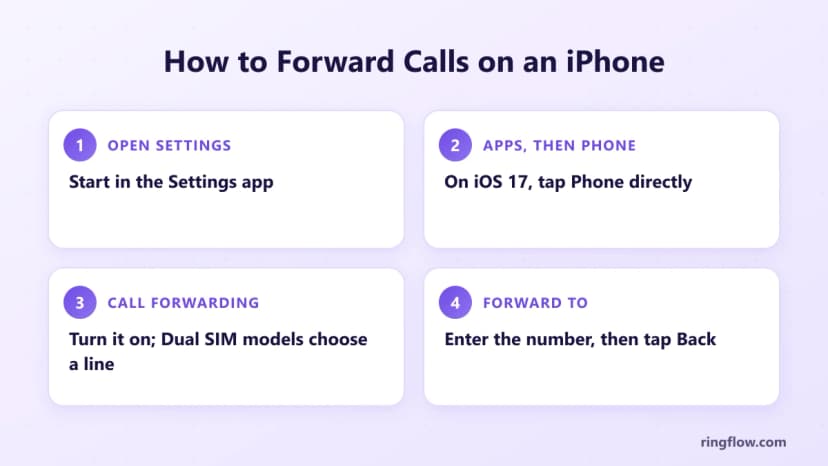
苹果将呼叫转移保留在“设置”应用程序中,而不是在“电话”应用程序中。在当前版本的 iOS 上, 苹果的步骤 是:
- 1打开 设置 应用程序。
- 2轻敲 应用程序,然后点击 电话.
- 3轻敲 呼叫转移 并将其打开。在具有双 SIM 卡功能的型号上,选择线路。
- 4轻敲 转发至,输入应接听电话的号码,然后点击返回。
在 iOS 17 上,路径为“设置”>“电话”>“呼叫转移”。当该功能开启时,状态栏中会出现转发图标。
苹果还指出,当您打开转接功能时,iPhone 必须处于蜂窝网络范围内,否则呼叫将不会被转接。
iPhone 菜单仅转接所有呼叫。 Apple 表示,若要在线路繁忙或空闲时进行转接,请联系您的运营商。另一条路线是从键盘输入的拨号代码。
如何在 Android 上转接电话
Android 菜单因制造商、运营商和软件版本而异,因此您手机上的措辞可能会有所不同。三星列出了适用于 Galaxy 手机的以下步骤:
- 1打开 电话 应用程序并点击 更多选择 (三个垂直点)。
- 2轻敲 设置, 然后 补充服务.
- 3轻敲 呼叫转移.
- 4选择始终转接、遇忙转接、无人接听时转接或无法接通时转接,然后输入转接号码。
这些选项与上面的转发类型匹配,因此 Galaxy 无需代码即可处理条件转发。如果您希望在呼叫转移到同事或第二部电话之前有机会接听,那么“无人接听时转接”是一个实用的选择。
其他 Android 品牌的名称和设置位置有所不同,因此请检查电话应用程序的通话或通话部分的设置。三星指出,可用性因运营商和手机型号而异。如果缺少该选项,请使用下面的拨号代码或询问您的运营商。
Verizon、AT&T 和 T-Mobile 的呼叫转接代码
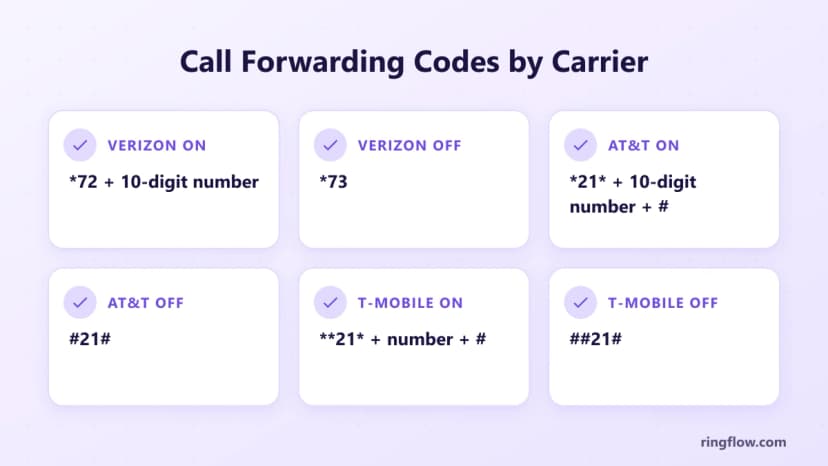
每个主要运营商都允许您通过拨打代码来打开转接,就像拨打电话一样。输入您想要将呼叫发送到的完整 10 位数号码。
| 载体 | 转接所有呼叫 | 关 | 很高兴知道 |
|---|---|---|---|
| 威瑞森公司 | *72+10位数字 | *73 | *71+10位号码仅转接未接电话 |
| 美国电话电报公司 | *21* + 10 位数字 + # | #21# | 等待至少三秒钟听到确认音 |
| T-Mobile | **21* + 数字 + # | ##21# | 代码以两颗星开头,而不是一颗星 |
这三个过程都是相同的:
- 1在手机的“电话”应用程序中打开键盘。
- 2使用表中的 10 位转接号码拨打您的运营商代码。
- 3按呼叫并保持通话状态,直到听到确认音或消息。
- 4从另一部电话拨打您的号码,并检查新号码是否响铃。
一些运营商规则可以省去麻烦。 美国电话电报公司 只允许您从无线电话本身更改转发,并且转发会覆盖您的语音邮件。 AT&T 也无法将呼叫转接至国际号码。
在 威瑞森公司,确认音 *73 听起来像是忙音,因此该声音表示已成功。
如何转接固定电话
北美固定电话通常使用 *72 来打开转发,使用 *73 来关闭转发。这是一项订阅功能,因此请先确认您的帐户中有该功能。 AT&T 的家庭电话步骤显示了其工作原理:
- 1拨打 *72(或 72#)并聆听拨号音。
- 2输入转接号码:如果是长途,则为 1 加 10 位号码;如果是本地呼叫,则为区号和 7 位号码;否则仅输入 7 位号码。
- 3等待确认音。然后系统呼叫转接号码。
- 4接听那个电话。如果线路占线或无人接听,则不会激活转接,因此请重复这些步骤。
要将家庭电话转接至手机,请在步骤 2 中输入您的手机号码,并在测试呼叫到达时接听您的手机。拨打 *73(或 AT&T 上的 73#)将电话转回固定电话。
AT&T 指出,转接呼叫可能会收取额外的本地和长途费用。
开启转接后,北美固定电话通常会在每个呼叫被重定向时响铃一次,并在您拿起听筒时播放断断续续的拨号音。
VoIP 和有线电视家庭服务还允许您在提供商的门户网站中管理转接,并且某些区域提供远程访问以从另一部电话更改转接。
如何关闭呼叫转移
转发将一直持续到您取消为止。使用与您的开启方式相匹配的方法:
- iPhone: 设置 > 应用程序 > 电话 > 呼叫转移,然后关闭开关。
- 三星银河: 手机应用 > 更多选项 > 设置 > 补充服务 > 呼叫转移,然后关闭活动选项。
- 威瑞森: 拨打*73。
- AT&T 无线: 拨打#21#并等待确认音。
- T-Mobile: 拨打##21#。
- 固定电话: 在 AT&T 家庭电话上拨打 *73 或 73#。
使用 GSM 代码设置的占线和无应答规则都有自己的关闭代码,因此取消所有呼叫转接可以使它们保持活动状态。 GSM 标准的##002# 会立即取消所有转发规则,但并非每个运营商都支持所有标准代码。
将商务呼叫转接至任何设备
将业务热线转发到您的手机可以运行几天,但有限制。它指向一个号码,转接的呼叫可以使用计划分钟数,并且在 AT&T 上,如果转接的电话占线,呼叫者会听到忙音。
下班后向其他地方拨打电话意味着手动更改设置。
Businesses have long forwarded their lines at the end of the day, often to an answering service. A cloud phone system works like a number forwarding service with rules instead of codes: the number lives in the cloud, one call can ring a desk phone,
a mobile app and a desktop app, and after-hours calls can go to an auto attendant or voicemail.
Ringflow's 云电话系统 gives you local numbers in US area codes or a 免费电话号码 and forwards calls to the Ringflow mobile and desktop apps, so you can redirect calls to mobile without dialing a code.
一个 自动服务员 can greet callers and route them after hours, and business texting runs on the same number.
If customers already know your number, you can port it instead of forwarding it indefinitely. For a separate work line, see our guides to a 虚拟电话号码 和 a second phone number for your business, or what a cloud business phone includes.
Call Forwarding Not Working? Quick Fixes
Most problems come from a mistyped code, the wrong line, or a carrier restriction. Work through these checks:
- Wait for the confirmation. Stay on the line until the tone or message plays; AT&T says at least three seconds.
- Check the number. Use all 10 digits. AT&T can't forward calls to an international number, so check your carrier's rules before forwarding outside the US.
- Turn it on with signal. An iPhone must be in cellular range when you set forwarding, or calls won't forward.
- Pick the right line. On a Dual SIM iPhone, choose the line that receives the calls.
- Answer the landline test call. With *72, forwarding only takes effect once someone answers at the other number.
- Clear old rules. A leftover busy or no-answer rule can send calls somewhere unexpected. On GSM carriers, ##002# clears them all.
- Find a missing menu. Availability varies by carrier and phone model, so try the dial code or ask your carrier.
On a GSM network, the status code *#21# shows whether all-calls forwarding is active. If calls still go to the wrong phone, your carrier's support team can check the setting on your account.
结论
Learning how to forward calls mostly means knowing where your phone keeps the setting: Settings > Apps > Phone on an iPhone, Supplementary services on a Samsung Galaxy, or your carrier's code on any mobile phone.
Landlines use *72 and *73, with a test call someone has to answer.
Carrier forwarding suits a short trip or a phone swap, but it sends every call to one number.
When business calls need to reach a team's mobile and desktop apps and follow set hours, Ringflow's cloud phone system handles that with a local or toll-free number, an auto attendant and number porting, and you can start with a free trial.
当你准备好时
Send Business Calls to Every Device
Get a local or toll-free business number that rings the Ringflow mobile and desktop apps, with an auto attendant for after-hours calls. Start a free trial and port the number you already have.
常问问题
On an iPhone, open Settings, tap Apps > Phone > Call Forwarding, turn it on, and enter the number under Forward To. On a Samsung Galaxy, open the Phone app and go to More options > Settings > Supplementary services > Call forwarding. You can also dial your carrier's code, such as *72 plus the 10-digit number on Verizon.
Call forwarding, also called call diversion, is a phone feature that redirects incoming calls to another number, such as a cell phone or a colleague's line. It can forward every call, or only calls that arrive when your line is busy, you don't answer, or your phone is unreachable.
It depends on the carrier. Verizon uses *72 followed by the 10-digit number, AT&T uses *21*, the number and #, and T-Mobile uses **21*, the number and #. Many North American landlines use *72 followed by the number.
Dial *73 on Verizon or on a landline that uses *72, #21# on AT&T wireless, or ##21# on T-Mobile. On an iPhone, go to Settings > Apps > Phone > Call Forwarding and turn it off. On GSM networks, ##002# cancels all forwarding rules at once.
通常不需要单独付费,但转接呼叫仍然需要付费。对于大多数计划,Verizon 不收取转接月费,但如果您的计划缺乏无限分钟数,则会对转接呼叫收取费用。 AT&T 按通话时长对转接的无线呼叫进行计费,并且可能会产生长途或漫游费用,因此请检查您的套餐。