
Introduktion
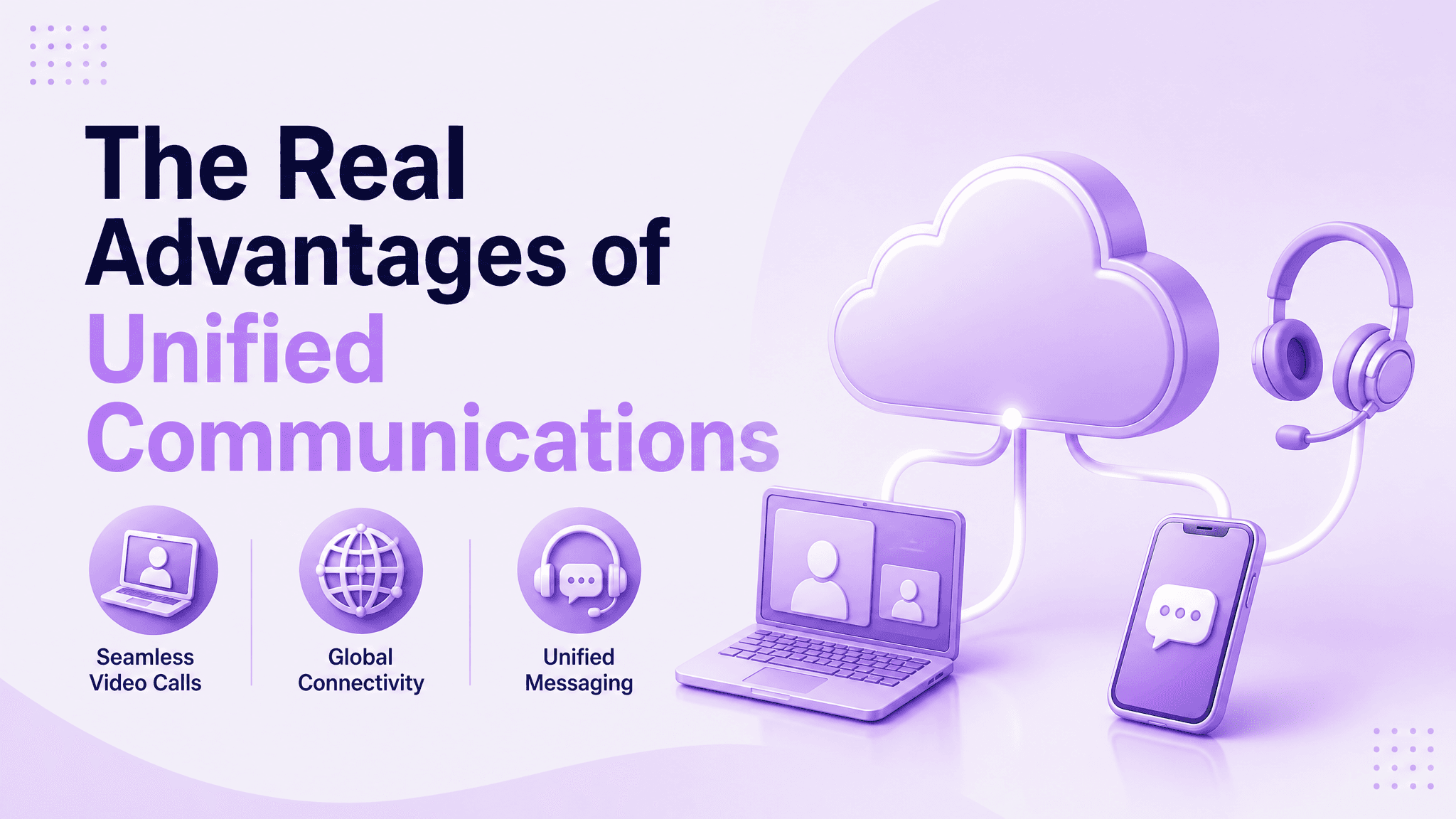
Unified Communications läggs nästan uteslutande ut på pris – ersätt en hög med leverantörskontrakt med en faktura och ställ ut det.
Den delen är verklig, men det är också den minsta biten av det som faktiskt förändras när telefon, video och meddelanden körs på en enda plattform istället för tre frånkopplade.
Den svårare frågan som de flesta pitches hoppar över är vad som händer efter bytet – om ett team faktiskt koordinerar snabbare, om introduktionen blir lättare och om besparingarna överlever kontakt med en riktig migrering. Den här guiden går igenom dessa svar direkt: kostnadsmatematiken,
hur man förvandlar återvunnen tid till en försvarbar ROI-siffra, koordineringen får team att märka från dag till dag, vilka förändringar för ett distribuerat team som delar ett system, och var fördelarna ärligt talat slutar med marknadsföringen.
Den bygger också på hur Ringflow närmar sig detta — en enda plattform som täcker röst, video, meddelanden och AI-assisterad samtalshantering istället för att sy ihop separata verktyg.
Varför "Enat" faktiskt är viktigt för ett företag
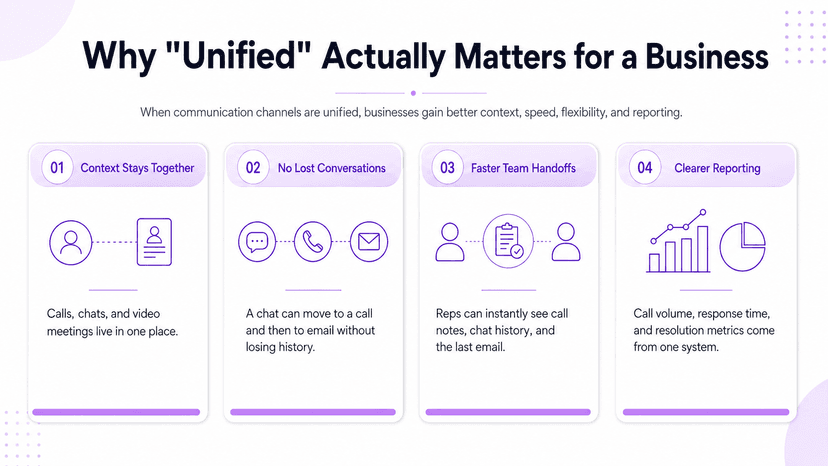
Ett telefonsystem, ett videoverktyg och en meddelandeapp som inte pratar med varandra skapar mer än ett mindre besvär – de skapar tre separata platser där konversationens sammanhang tyst kan försvinna.
En kundinteraktion som börjar i chatten, flyttar till ett samtal och behöver ett uppföljande e-postmeddelande bör inte kräva att någon manuellt sätter ihop historiken igen efteråt.
Att förena dessa kanaler innebär en samtalslogg, en lagchatt tråd och ett inspelat videomöte alla live på samma plats, knutna till samma kontaktpost.
Den enda detaljen är där de flesta av fördelarna nedströms - kostnad, hastighet och flexibilitet - faktiskt spåras tillbaka till.
- Att ta upp en tappad tråd utan friktion — en supportrepresentant som täcker en kollega på tjänstledighet ser hela historiken: samtalsanteckningar, chattlogg och senaste e-postmeddelande, istället för att börja från ett tomt blad och be kunden att upprepa sig
- Inget påtvingat kanalval för kunden - vissa föredrar fortfarande ett telefonsamtal, andra föredrar att sms:a eller använda chatt, och att förena backend betyder bara vilken kanal som används, posten för den landar på samma plats efteråt
- Enklare rapportering för företaget – samtalsvolym, svarstider och upplösningshastigheter hämtas från ett system istället för att stämma av tre separata exporter med olika kontakt-ID, tidsstämpelformat och definitioner av vad som räknas som löst
Kostnadsfallet för att konsolidera kommunikationsverktyg
Besparingarna är verkliga och någorlunda konsekventa i oberoende studier: företag som flyttar till en enhetlig plattform minskar vanligtvis de totala kommunikationskostnaderna med ungefär en fjärdedel till två femtedelar.
För ett företag med hundra personer fungerar det intervallet till någonstans mellan $20 000 och $60 000 per år, beroende på hur föråldrad och spridd den tidigare installationen var.
Storleken på det antalet beror mycket på vad ett företag faktiskt ersätter. Vår uppdelning av telefonsystem prissättning täcker vilka enheter som spred sig – maskinvarans ålder, avtalsvillkor och hur många separata leverantörer som fakturerade oberoende före bytet.
- Kör redan en modern, väl underhållen installation – besparingarna hamnar i den lägre delen av det intervallet snarare än den höga delen, eftersom det finns mindre avfall att trimma ut
- En faktura istället för tre – inga separata faktureringscykler att stämma av, inga tre förnyelsedatum att spåra och inga tre separata avbrottsbiljetter att lämna in när något går sönder
- Mindre hårdvaruräkning utöver det - bordstelefoner och lokal växelutrustning ersätts av programvara som körs på enheter som anställda redan äger, även om det vanligtvis är en mindre del av det totala antalet än de återkommande prenumerationsbesparingarna
Förvandla återvunnen tid till mätbar ROI
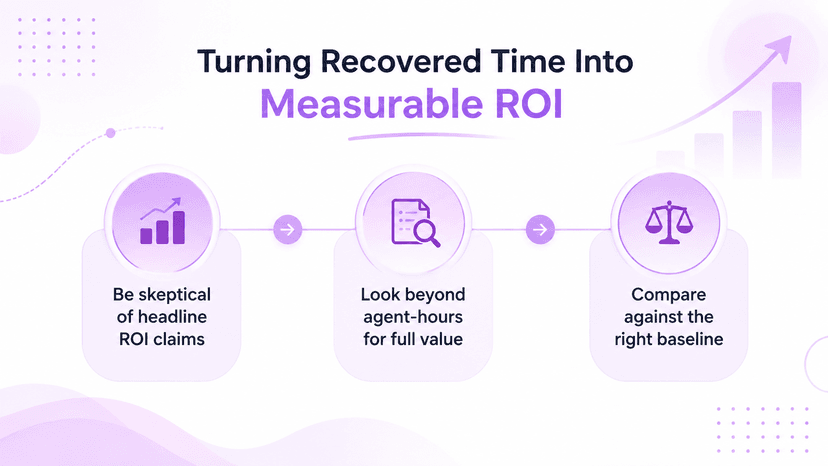
Fallstudier från leverantörer älskar en siffra för ROI, och några av dem är verkligen slående - en ofta citerad analys visar att en medelstor utrullning har en treårig avkastning norr om 2 000 %. Siffror som är dramatiska är undantaget, inte en baslinje som någon borde planera en budget kring.
Ett stadigare sätt att mäta avkastningen är återhämtningstiden snarare än en enstaka procentsats. Ringflows AI-assisterade samtalssammanfattningar och automatiserade loggning kan spara en agent två till fem minuter per samtal; multiplicera det med ett team på tjugo personer som hanterar femtio samtal om dagen,
och den dagliga summan landar långt över hundra agenttimmar - arbete som brukade ske för hand och nu helt enkelt inte gör det.
- Behandla ROI-siffror från huvudleverantörer skeptiskt – oberoende forskning om enhetlig kommunikationsproduktivitet är en användbar kontroll, eftersom den inte kommer från någon som har något att sälja
- Titta efter agenttimmar när du bygger ärendet – snabbare svarstider dyker ofta upp nedströms i kundretention och affärens hastighet också, svårare att kvantifiera men ofta vad ledarskapet faktiskt bryr sig om mest
- Tänk på baslinjen innan du jämför — att mäta ROI mot ett redan effektivt system kommer alltid att se mindre dramatiskt ut än att mäta det mot ett som höll på att falla isär; ingen jämförelse är fel, de svarar bara på olika frågor
Snabbare koordination, färre tappade handoffs
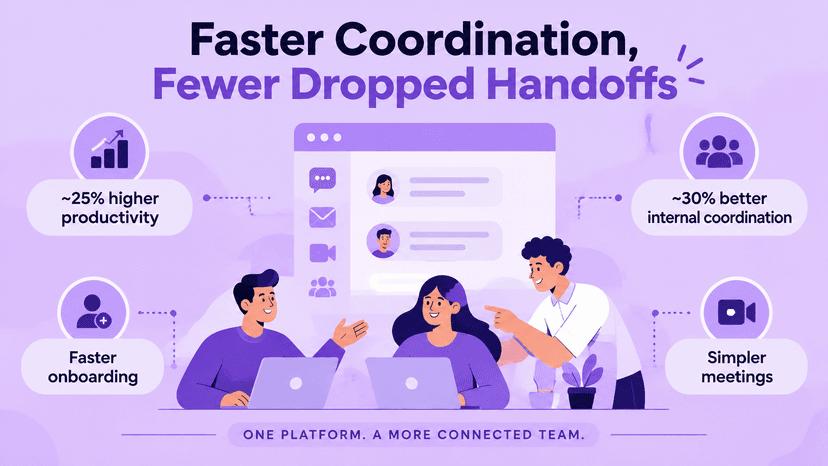
Oberoende analytikerforskning visar att den totala produktivitetsvinsten från enhetlig kommunikation ligger på ungefär en femtedel till en fjärdedel, med den interna samordningen som specifikt förbättras med närmare en tredjedel.
Team som regelbundet arbetar över avdelningar eller platser tenderar att landa i den högre delen av det intervallet.
Det mesta av den vinsten går inte att spåra till någon enskild funktion – den kommer från att ta bort den lilla friktionen med att växla mellan fyra separata appar för att slutföra en uppgift.
En statusuppdatering som brukade betyda att man kollade e-post, sedan chatt och sedan ett separat videoverktyg som nu händer i en tråd istället.
- Snabbare introduktion, även om det sällan faktureras som en produktivitetsvinst - en inloggning, en katalog och ett meddelandesystem får en ny anställning till full fart snabbare än att kombinera åtkomst till tre separata verktyg
- Förbinds snabbast med omsättning eller tillväxt - ett team som anställer en person per år märker knappt skillnaden, medan ett team som anställer tjugo en fjärdedel märker det omedelbart, eftersom installationskostnaden betalas upprepade gånger
- Enklare möten utöver det – schemaläggning, uppringning och delning av en skärm sker inom samma inloggning som ett team redan använder för allt annat, istället för en separat app som återupptäcks först när någon skickar en inbjudan till det
Hålla distribuerade team på ett system
En enhetlig plattform gör konsekvent kommunikation över kontor och tidszoner till standardinställningen snarare än något IT-ingenjörer separat för varje ny plats.
Att öppna ett andra kontor eller absorbera ett team genom ett förvärv innebär att utöka ett befintligt system, inte bygga ett parallellt från grunden.
Den fördelen förvärrar företag med en genuint fördelad arbetsstyrka.
Vår guide till teamkommunikation på distans går djupare in på vad som förändras när ett team inte delar en byggnad, och varför närvaro- och statusfunktioner börjar bli viktigare när ingen bara kan titta över rummet.
- Ett brett citerat fall som involverar ett stort företag rapporterade ungefär 30 % produktivitetsökning efter att ha implementerat realtidsnärvaro i sina befintliga verktyg – se det som en stark övre gräns snarare än ett typiskt resultat, eftersom de flesta företag landar långt under den i praktiken
- Tidszoner skapar en mer subtil version av samma problem – närvaroindikatorer som visar när en kollega faktiskt är online, snarare än att bara gissa baserat på klockan, minska antalet fram och tillbaka av meddelanden som skickas och besvaras med åtta timmars mellanrum
- Sammanslagningar och förvärv är där denna fördel dyker upp mest synligt, om minst ofta - att vika ett förvärvat teams telefonnummer, anknytningar och samtalsdirigering till en befintlig plattform tar vanligtvis dagar snarare än månaderna som en separat maskinvaruinstallation på varje plats annars skulle kräva.
- Ingen av den flexibiliteten kräver att varje kontor kör identisk hårdvara heller - en molnbaserad plattform fungerar på samma sätt oavsett om någon ringer in från en bärbar dator, en personlig telefon eller en webbläsarflik
Där fördelarna faktiskt kommer till korta
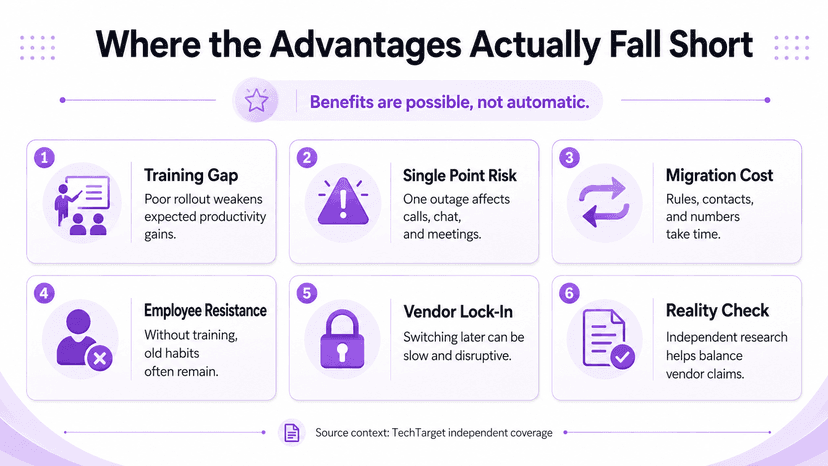
Inget av detta sker automatiskt. En enhetlig plattform som rullas ut utan riktig utbildning eller en tydlig migreringsplan tenderar att underprestera varje siffra som citeras ovan, ibland dåligt. Verktyget skapar möjlighet till dessa vinster; det garanterar inte att någon faktiskt fångar dem.
Konsolidering byter också ut flera oberoende felpunkter mot en.
Ett avbrott påverkar nu telefon, video och meddelanden samtidigt istället för bara en enda kanal – en verklig kompromiss som är värd att väga ärligt mot kostnads- och produktivitetsfallet, inte något att slänga över i en försäljningsförklaring.
- Migrationen i sig medför en kostnad som sällan dyker upp i ROI-prognoserna – att flytta samtalsdirigeringsregler, kontaktuppgifter och befintliga telefonnummer från ett äldre system tar flera timmar, och att skynda på det steget för att nå ett lanseringsdatum är ett vanligt sätt som en lansering börjar på fel fot
- Anställdas motstånd är den tystare versionen av samma risk – personal som har använt den gamla telefonen och videoinstallationen i flera år välkomnar inte automatiskt ett nytt gränssnitt, och en lansering som hoppar över riktig träning tenderar att se gamla vanor kvarstå i månader tillsammans med det nya verktyget
- Inlåsning av leverantörer är också värt att nämna tydligt - när samtalshistorik, kontaktuppgifter och arbetsflöden finns i en plattform, kostar det att byta leverantör senare realtid och störningar, en rättvis handel för de flesta företag men inte en att gå in utan att förstå att det går in
TechTargets täckning av enhetlig kommunikationsproduktivitet är en användbar verklighetskontroll även här, eftersom den väger dessa påståenden oberoende snarare än att upprepa vad en leverantörs egen fallstudie säger.
Slutsats
Ingen av dessa fördelar står helt för sig själva. Kostnadsbesparingarna, den återvunna tiden, samordningsvinsterna och flexibiliteten för distribuerade team förvärras när ett företag faktiskt slutför bytet och hanterar utbyggnaden med viss försiktighet.
Den ärliga versionen av denna pitch är inte att unified communications fixar allt på egen hand. Det är att konsolidering på en plattform tar bort tillräckligt med friktion, på tillräckligt många ställen, så att fördelarna tenderar att dyka upp naturligt – förutsatt att utbyggnaden får den uppmärksamhet den faktiskt behöver.
Ringflow är byggd för precis det: ett system som täcker inkommande och utgående samtal, AI-assisterade sammanfattningar och CRM-integration, så att teamen spenderar mindre tid på att hantera verktyg och mer tid på att använda dem.
För ett företag som fortfarande väger bytet är den mer användbara frågan inte om dessa fördelar finns i allmänhet - bevisen för det är solida. Det handlar om huruvida det specifika teamet, arbetsbelastningen och nuvarande upplägg faktiskt matchar de förhållanden där dessa siffror håller i praktiken.
Det är också rätt objektiv för att läsa varje figur i den här guiden. Behandla var och en som ett intervall som formats av adoptions- och utrullningsdisciplin, inte en garanti som kommer automatiskt i samma ögonblick som ett kontrakt undertecknas och det gamla systemet stängs av.
Klar när du är
Vill du ha ROI-sidan av Unified Communications för säljteam?
Se hur Ringflows Cloud Contact Center och AI Sales Platform återvinner agenttid genom AI-driven samtalsoptimering och coachning.
FAQ
Kärnfördelarna är lägre totala kommunikationskostnader, snabbare intern koordinering, lättare skalning när ett företag växer och konsekvent kommunikation mellan distribuerade team. De flesta av dessa går tillbaka till en enda plattform som ersätter flera frånkopplade verktyg.
Studier visar konsekvent besparingar på ungefär 25 % till 40 % av de totala kommunikationskostnaderna. För ett företag med hundra personer kostar det vanligtvis $20 000 till $60 000 per år, beroende på hur föråldrad den tidigare installationen var.
Vissa publicerade fallstudier rapporterar ROI långt över 1 000 % inom tre år, men de är extremvärden, inte en baslinje. Ett mer realistiskt sätt att mäta det är återvunnen agenttid - ofta långt över hundra timmar om dagen för ett medelstort team.
Oberoende analytikerundersökningar pekar på verkliga vinster på ungefär 20 % till 25 % totalt sett, med den interna samordningen som förbättras med närmare 30 % för team som arbetar över avdelningar eller platser. Vinsterna är äkta men beror till stor del på adoption.
En utrullning utan ordentlig utbildning tenderar att underleverera på alla fördelar. Konsolidering innebär också att ett avbrott påverkar telefon, video och meddelanden på en gång istället för bara en kanal, vilket är en riktig avvägning mot kostnadsbesparingarna.