
Introduction
Most businesses only think about phone lines when the bill arrives or the system fails. If you run a PBX, the lines that connect it to the outside world are a big part of that bill, and they are often sold in bundles that no longer match how your team works. So what is SIP trunking, and why do so many companies now use it to replace old copper circuits?
This guide explains what SIP trunking is, how a call travels through one, and how to work out how many channels you need. It also covers the real benefits, the questions to ask providers, and the security steps that protect your calls. By the end, you will know whether SIP trunking fits your setup and what to check before you sign a contract or move a single number.
What Is SIP Trunking?
SIP trunking is a way to connect your business phone system to the public phone network over an internet connection instead of physical phone lines. SIP stands for Session Initiation Protocol, the standard that starts, manages, and ends voice calls over IP networks. The trunk is the virtual link between your PBX and your provider, and it carries every call to and from the outside world.
Instead of buying a fixed bundle of copper lines, you buy channels, and each channel carries one call at a time. That makes SIP trunking flexible, because adding capacity is a settings change rather than an installation visit. It is not a phone service on its own: it works with a PBX you already own, on site or in the cloud, and gives it a way to reach everyone else.
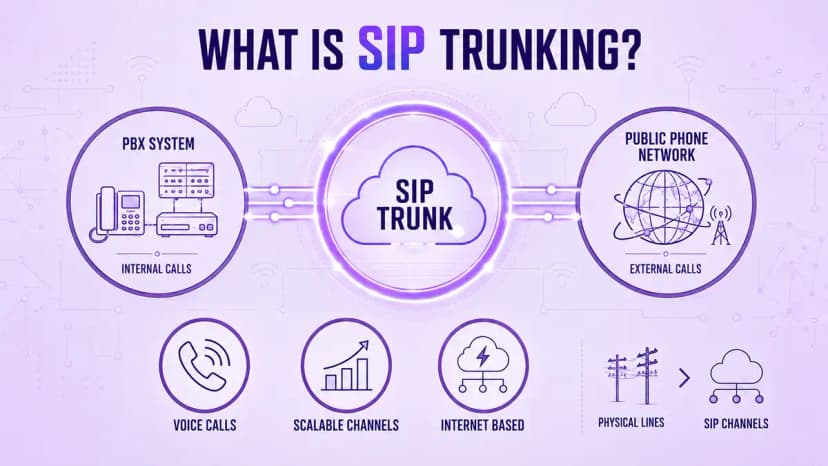
- Connects your PBX to the public phone network over the internet
- Uses the Session Initiation Protocol to set up, manage, and end each call
- Replaces PRI circuits and other physical lines that carry a fixed number of calls
- Sells capacity in channels, where each channel carries one simultaneous call
- Works with on-site PBX hardware or a cloud-hosted virtual PBX
- Lets you keep your existing phone numbers when you port them to the new provider
- Differs from hosted VoIP, which bundles the phone system and the service together
- Gives you more control than a hosted service, with more setup work in return
How Does SIP Trunking Work?
When someone in your office dials a number, your PBX sends a call request to your SIP trunk provider using the SIP protocol. The provider checks the request, then connects the call to the public phone network or to another SIP endpoint. Once the other person answers, your voice travels as small digital packets over the internet for as long as the call lasts.
The setup works with on-site hardware or a cloud system, and the PBX vs VoIP comparison explains how those two choices differ. In both cases the trunk is the bridge to the outside world. Because every call rides on your internet connection, quality depends on bandwidth, low delay, and stable routing, so test all three on your real network before you cut over, and repeat the test at your busiest time of day.
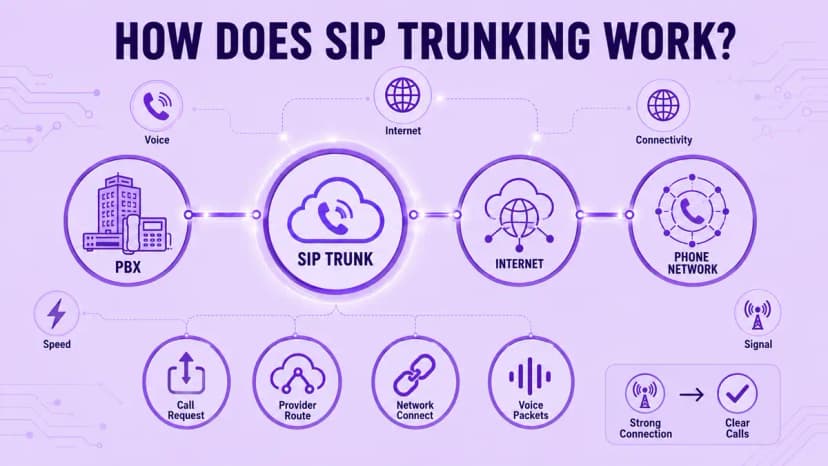
- Your PBX sends a call request to the provider using the SIP protocol
- The request travels over your internet connection to the provider's network
- The provider connects the call to the public phone network or another SIP endpoint
- Voice is converted into digital packets and sent in both directions
- Each active call uses one channel from the trunk for as long as it lasts
- A common codec needs roughly 80 to 100 kbps of bandwidth for every call
- Inbound calls follow the same path in reverse, from the network to your PBX
- Low delay and stable routing matter as much as raw internet speed
How Many Channels Do You Need?
Channel count is the biggest sizing decision, and many businesses simply guess. A channel carries one call at a time, so the number you need is the most calls you expect at the same moment, not the total for the day. Buying too few means busy signals when it matters most, while buying too many means paying every month for capacity that sits idle and never earns its cost.
The best way to size a trunk is to look at real data. Pull call logs from your busiest hour, find the highest number of overlapping calls, and then add some headroom for growth and spikes. Also count calls that sit in queues, voicemail, or forwarding, since each one still holds a channel while it is connected. Round up to the nearest bundle your provider sells.
- Pull call logs from your busiest hour over the last few months
- Find the peak number of calls that overlapped at the same moment
- Count forwarded calls, queued calls, and conferences, since each holds a channel
- Add roughly 20 percent headroom for growth and unexpected spikes
- Split inbound and outbound needs if your provider sells them separately
- Check that your internet connection has enough bandwidth for every channel
- Review the number every year, and again after any large staffing change
What You Gain by Switching
The most obvious gain is cost. A physical line carries fixed monthly charges whether it is busy or not, while SIP trunking lets you pay for the channels you actually use, and many plans bundle calling minutes. When you compare business phone system costs, include line rental, maintenance, installation, and long-distance charges, not just the headline price per channel, since those extras often change the answer.
Flexibility matters just as much. Adding ten channels for a busy season, or removing them afterward, is usually a configuration change instead of a hardware order with a long lead time. Businesses with several offices can also share one pool of channels and keep local numbers in cities where they no longer have a physical line. That makes growth, moves, and closures far easier to plan.
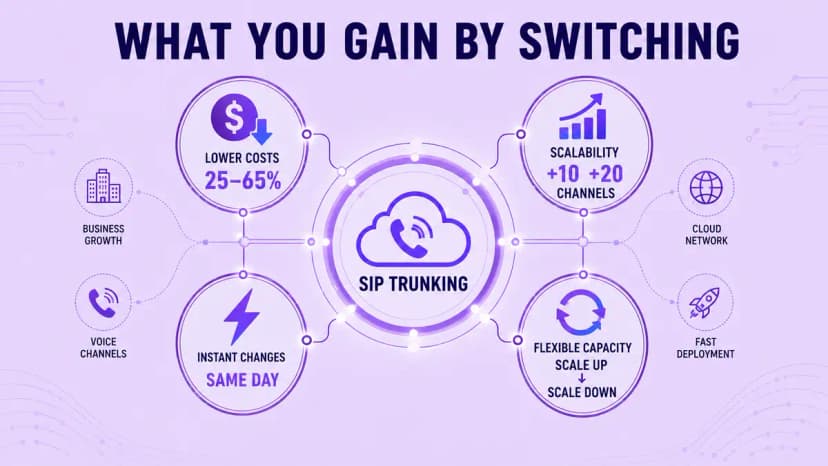
- Pay for the channels you need instead of a fixed bundle of physical lines
- Add or remove capacity quickly, often on the same day you ask
- Share one pool of channels across several offices or locations
- Keep local numbers in cities where you no longer have an office
- Avoid line rental, installation, and maintenance charges tied to copper circuits
- Bundle local and long-distance calling into predictable monthly plans
- Add a second route for failover without buying extra physical circuits
- Move or expand offices without waiting for a new line to be installed
What to Ask Before Choosing a Provider
Providers look similar on a pricing page, so the questions you ask matter more than the price per channel. Start with compatibility: confirm that the provider supports your PBX model or cloud phone system, and that it will help with testing before the cutover. Then ask about number porting, how long it takes, and whether you can keep every number you use today without a gap in service.
Next, look at call quality and support. Ask which codecs and regions are supported, where the provider's network meets the public phone network, and how quickly its team answers during an outage. A provider such as Ringflow, which builds routing and reporting into its contact center platform, can also reduce the number of vendors you manage. Get every answer in writing before you sign.
- Confirm compatibility with your PBX or cloud phone system before you sign
- Ask how number porting works, how long it takes, and what it costs
- Check which codecs the provider supports and how it protects call quality
- Ask how 911 addresses are registered and updated for each location
- Compare pricing models: per channel, per minute, or unlimited calling
- Read the contract for minimum terms, early exit fees, and overage charges
- Ask for a written uptime commitment and a public status page
- Test support by asking a technical question before you buy
Security and Reliability
SIP trunking does not encrypt your calls by default, because the SIP protocol handles call setup rather than privacy. That is why security deserves its own review. The NIST VoIP security guide describes threats such as eavesdropping, denial of service, and toll fraud, and it gives you a useful checklist when you review a provider, so use it to shape your questions before any sales call.
Reliability needs the same attention. A session border controller filters bad traffic before it reaches your PBX, and a second internet connection or backup route keeps calls flowing if the main line fails. Test failover every quarter instead of assuming it works, and set spending caps so that one compromised account cannot run up a huge bill of calls overnight or over a long weekend.
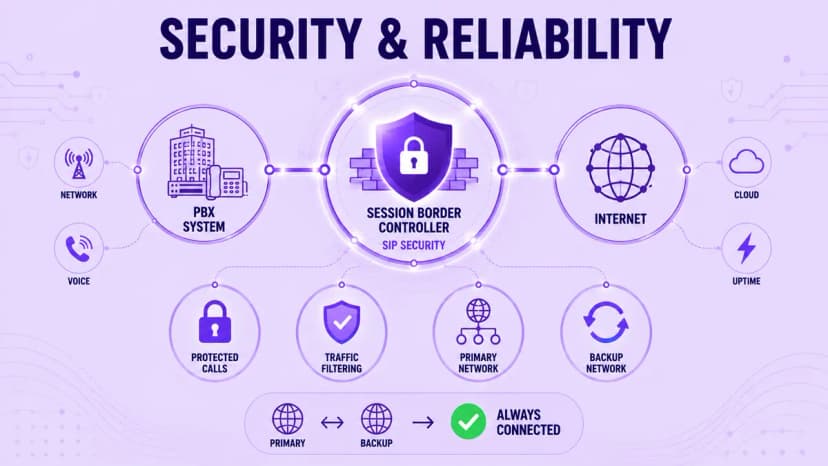
- Use TLS for call setup and SRTP for voice so calls cannot be intercepted
- Place a session border controller between your PBX and the internet
- Restrict trunk access to approved IP addresses and use strong credentials
- Block international destinations you never call to reduce toll fraud risk
- Set spending limits and alerts for unusual call volume or destinations
- Add a backup internet line or a second trunk route for failover
- Forward calls to mobile numbers automatically if the trunk goes down
- Test failover every quarter and record how long recovery takes
Conclusion
SIP trunking connects the PBX you already own to the phone network over the internet, and it replaces fixed physical lines with flexible channels. When you size those channels from real call data, compare total costs honestly, and check security and failover before you sign, it becomes one of the more practical upgrades a phone system can get. The steps are simple, but skipping any of them tends to be expensive.
Start with your busiest hour of call data, and let that number guide your channel count instead of a guess. Then use the questions in this guide to compare two or three providers side by side. Ringflow can help teams manage routing, reporting, and call handling once the connection is in place, so your phone system stays flexible as the business grows and the call patterns change.
Ready when you are
Guessing at Channel Count Is the Fastest Way to Overpay
Ringflow's platform sizes and secures your connection so you never run out of capacity or overpay for it.
Frequently Asked Questions
It is a way to connect your business phone system to the public phone network over the internet instead of physical phone lines. It uses the SIP protocol to set up, manage, and end each call.
Not exactly. SIP trunking is one form of VoIP that connects an existing PBX to the phone network, while hosted VoIP bundles the phone system and the calling service together.
Yes. A SIP trunk connects to a PBX, which can be on-site hardware or a cloud-hosted system. Without a PBX, a hosted phone service is usually the simpler choice.
Count the highest number of calls that overlap during your busiest hour, then add about 20 percent headroom. Round up to the bundle size your provider offers.
It can be, when the provider supports TLS and SRTP encryption, uses session border controllers, and monitors for toll fraud. Ask for specifics before you sign.