


Introduction
UCaaS providers provide business communications through a subscription service. Rather than having to invest in a phone system, servers and individual applications, businesses can pay a monthly fee for their calling, messaging and video conferencing features per user.
There are a lot of providers in the market and they come from different backgrounds. Some began with phone services, some with conferencing and some with contact centers. This guide will explain how they work, what the main types are, what features to look out for, how much they cost and how to choose one to suit your team.
What Do UCaaS Providers Offer?
UCaaS stands for Unified Communications as a Service. Providers host the infrastructure and make sure it is updated. They deliver the service through browser, desktop and mobile apps. This means that your staff will have calling, team messaging, video conferencing and voicemail all in one place. You can manage users and change settings through an admin portal.
Most providers will also integrate with your current tools. Ringflow Cloud Phone provides calling, video and messaging in one place. It also has an AI receptionist which can answer calls on all lines.
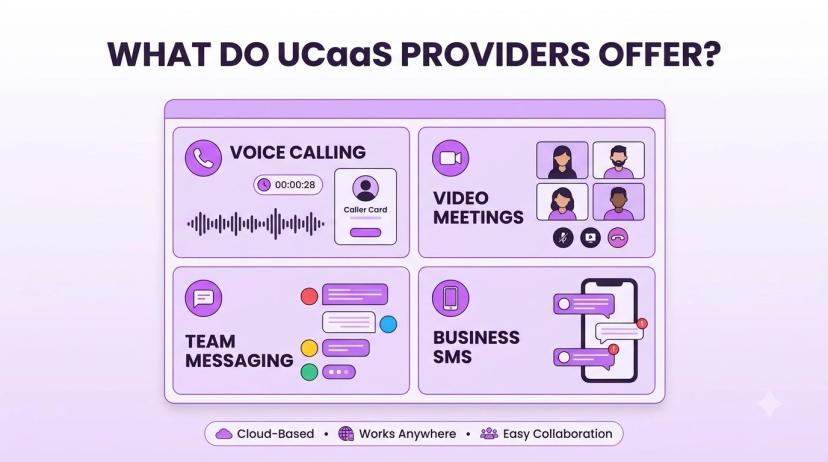
Most teams will move to a UCaaS provider because they have issues with:
- Multiple tools. Having separate tools for calling, chatting and conferencing.
- Hardware. The phone systems and servers can require maintenance and replacing.
- Remote workers. Employees working remotely can struggle to use the phone system.
- Manual changes. Adding users or changing menus will require technicians.
- No history. No one can view previous calls and messaging.
Types of UCaaS Providers
Not all providers are exactly the same. Depending on what they began as, they will offer different features. If you'd like to understand more, see the guide on what UCaaS is. The table below shows the different types.
| Type | Best for | Strength | Watch out for |
|---|---|---|---|
| Suite-first vendors | Large companies already on one office suite | Messaging and meetings tightly linked | Calling can feel like an add-on |
| Phone-first providers | Teams replacing a business phone system | Strong calling, numbers and call routing | Meetings and chat may be simpler |
| Contact-center-led platforms | Sales and support teams | Queues, routing and reporting built in | More features than a small office needs |
| Carrier and regional providers | Businesses with local number or compliance needs | Direct network and local support | Fewer integrations and apps |
Many businesses will need UCaaS and a contact center. UCaaS is used within your business for employees to communicate with each other and customers. Contact center solutions are used for high volume customer interactions with queues and scoring. Some providers offer both services.

Core UCaaS Features to Compare
Although vendors will have lots of features, most will appear similar. The key features to look out for are:
- Calling. Local and toll free numbers, call routing, voicemail and call recording.
- Chatting. Chat channels and direct messaging.
- Conferencing. Browser conferencing, screen share and recording.
- Apps. Desktop and mobile apps.
- Auto attendant. Menus and business hours to direct callers to the correct person.
- Integrations. Integration with your CRM, calendar and help desk.
- Admin portal. Easily add users, change settings and view reports.
- Support. Hours offered, channels offered and who can support with onboarding.
The best UCaaS providers aren't the ones with the most features but the ones with easy to set up features that your team use every hour. Audio is more important than most people think so try calling using your laptop, phone and desk phone.
Other features worth a look are AI call summaries, call analytics and any limits on recording storage. They are nice to have, but check whether they cost extra before they influence your decision.

UCaaS Pricing and Costs
UCaaS pricing is usually charged per user per month. You can usually upgrade to higher packages with more features. Be aware of the following:
- Minimum seats. Some packages will require a certain number of seats.
- Additional costs. Extra storage for recording, AI tools, international calling and extra numbers.
- Numbers. Cost for porting numbers, new numbers and toll free numbers.
- Hardware. Cost for desk phones, headsets and conference room equipment.
- Contract. Monthly or yearly.
You will usually save money if you pay yearly. Ensure you ask for both options. Ringflow lists plans from $7.99 per seat per month billed annually, or $12.99 billed monthly. There is also a minimum of 1 seat on the starter plan. Ask for a full quote with all the extras included so you can compare UCaaS pricing fairly.
Watch for price changes too. Introductory pricing can rise at renewal, so ask what the price will be after the first term and how much notice you get before it changes. Also ask whether taxes and carrier fees are included in the quote.
How to Compare UCaaS Providers
Begin by looking at your team requirements. To help you:
- 1Create a list. What calling, messaging and conferencing features do you need?
- 2Number of users. How many users, offices and remote users do you have?
- 3Integration. Are you integrated with your CRM, calendar and help desk?
- 4Plan limits. Are there any premium features? Are there any limits on storage/usage?
- 5Audio. Can you make calls using your devices?
- 6Migration. How are numbers ported? How long does it take? Who can help?
- 7Pilot. Trial on a small team for a couple of weeks. Ask what slowed them down.
Ringflow offers a 14-day free trial with no credit card required. It also offers free number porting to make it easy for a small team to try. Ask for a trial using your numbers and devices. Involve the people who will use it every day. A receptionist, a salesperson and a manager will all notice different problems in the first week.
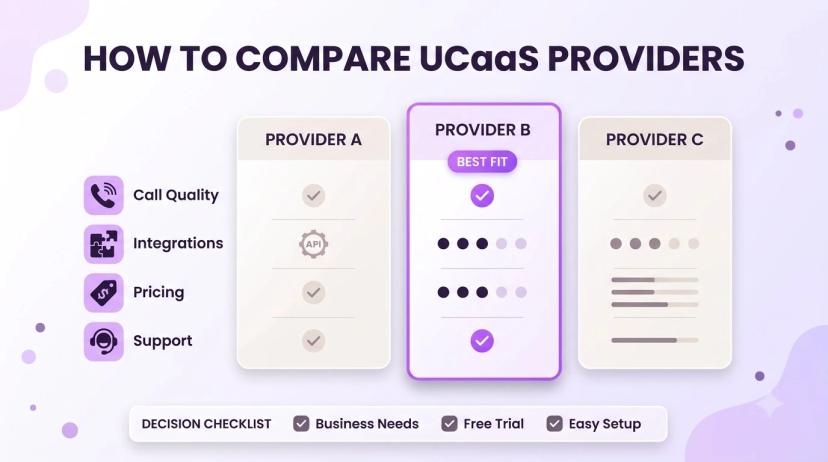
Common mistakes include choosing the provider with the most features, not checking the monthly price includes any extras, not doing a pilot and not involving those answering the phones.
Security and Compliance
As UCaaS is a cloud service it can help to understand what a good one looks like. According to NIST, there are 5 essential characteristics of cloud computing: on demand self-service, broad network access, resource pooling, rapid elasticity and measured service. This can be a useful checklist to ensure any provider you choose meets these requirements. As communications will contain customer information and recordings you should also ask:
- Secure. Are calls and messages encrypted?
- Access. Who can access recordings and call logs?
- Emergency calls. How are 911 calls handled for each user and location?
- Caller ID. Is STIR/SHAKEN caller ID used for outgoing calls?
- Data. Where is data stored and for how long?
- Uptime. What is the uptime guarantee? How are credits handled?
Emergency calling needs extra care with a cloud system. People can work from anywhere, so ask how each user's location is recorded and updated so that a 911 call reaches the right responders.
Ask for confirmation in writing. A confident 'yes' during a sales call won't count and policies won't help unless someone in your team owns them.
Conclusion
The best UCaaS providers will be those that match your team's processes. Make sure they meet your requirements, you understand what is included in the price and audio is good. Compare at least three providers side by side before you decide.
Do a trial. A short trial with real calls will give you much more information than a brochure. Ringflow offers a free trial to allow you to easily see how it works with your team and numbers.
Ready when you are
Ready to test a UCaaS provider with a real trial?
Start a 14-day free trial and test calling, video and messaging from one login with your own numbers.
Frequently Asked Questions
They provide hosted business communications. Usually this includes calling, messaging and conferencing. You pay a monthly fee per user.
Most are charged per user per month. There are often premium packages with extra features. Make sure you understand what the minimum number of seats is, any additional costs, number costs and contract.
This depends on your team. If you're a large company using one office suite the best UCaaS provider would be different to a small team looking to replace their phone system. Make sure they match your requirements.
UCaaS is used within your business for employees to communicate. CCaaS is used as a contact center to manage high volume customer interactions with queues, routing and scoring.
Yes usually. Most providers can port your numbers. Ensure you understand how long it will take and if there are any costs involved. Ringflow offers free number porting.


